Withdraw Invite Automation Flow
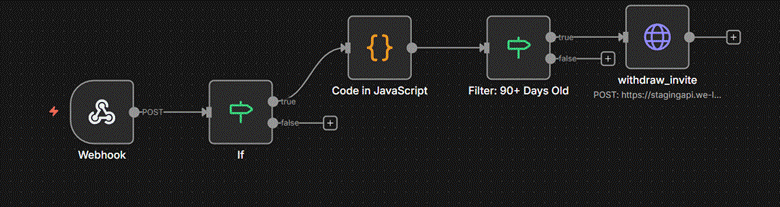
This n8n template automatically withdraws invitations to users who have been inactive on WeLink for 90+ days. The workflow listens for incoming webhook events, evaluates user conditions, and triggers the appropriate actions based on the user's inactivity status.
Flow Steps Explained
1. Webhook Trigger
The workflow starts with a webhook that listens for relevant user events from WeLink in real-time. This ensures that the workflow reacts instantly to incoming data.
2. Conditional Check (IF)
The workflow evaluates whether the incoming data meets the required conditions for further processing. If the condition is true, it proceeds — otherwise, the workflow stops for that event.
3. Custom JavaScript Processing
A JavaScript node processes the incoming user data, preparing it for the next step. This may include filtering, formatting, or enriching the data to ensure only eligible users are targeted.
4. Filter: 90+ Days Old
This filter checks whether the user's last activity was over 90 days ago. Only users who meet this criteria are considered for the withdrawal action.
5. Send Invitation (withdraw_invite)
Users who pass the 90+ days filter are automatically sent a withdrawal request via the WeLink API. The node safely handles the POST request to avoid duplicates and ensures successful delivery.
Outcome
This workflow creates a fully automated re-engagement loop that targets inactive users, helping increase user activity and platform engagement without manual effort.